Fall/Winter 2025-2026: Applying for Full-Time OSAP
Students can now complete a 2025-26 OSAP application for full-time students on the OSAP website. We recommend that you complete your OSAP application by June 30, 2025 to ensure you get your funding before your classes begin.
Table of Contents
Eligibility Requirements
To be eligible to apply for OSAP, you must:
- be a Canadian citizen, Permanent Resident or Protected Person
- meet Ontario’s provincial residency requirements
- be enrolled in a degree, diploma, or certificate program
- be studying full-time or part-time at an OSAP approved institution
Percentage Course Load Guide
Undergraduate students must be taking 60% or more of a full course load to be considered for the full-time student assistance program (Full-time OSAP). This means a minimum course load of 1.5 credits per term. For students with a registered disability, a full-time course load is a minimum of 1.0 credits.
Note
If you’re registering for two different course loads during the fall and winter terms then you need to put your fall term course load on your OSAP application and then send us an email.
For example: if you’re taking 2.0 credits in the fall and 1.5 credits in the winter, then you need to put a 100% course load on your OSAP application and send us an email letting us know that you’re taking 1.5 credits in the winter.
Graduate students must be designated as a full-time graduate student by the Office of Graduate Studies. If you’re a part-time student, you will need to apply for Part-Time OSAP.
The chart below can be used to determine your course load percentage based on the number of credits you’re taking:
| Undergraduate Course Credits per term | Course Load | OSAP funding available |
| 2.0 or more credits | 100% | Full-time |
| Work Term | 100% | Full-time |
| 1.5 credits | 60% | Full-time |
| 1.0 credits | 40% | Part-time, or full-time for students with a permanent disability |
| 0.5 credits | 20% | Part-time |
Note:
There is no such thing as an 80% course load during the fall/winter terms.
Application Instructions
Step 1 – Start a new full-time OSAP application
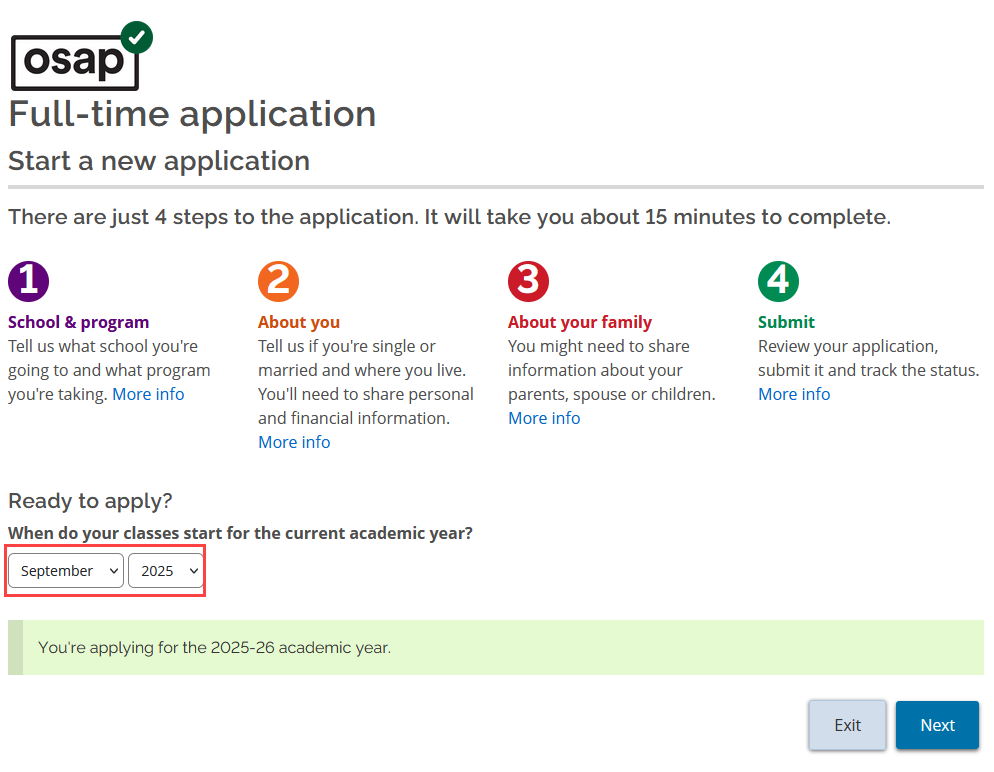
- Login to your OSAP account at ontario.ca/osap and start a new full-time OSAP application.
- When you are asked when your classes start, select September 2025 and click Next.
Step 2 – Enter your student number
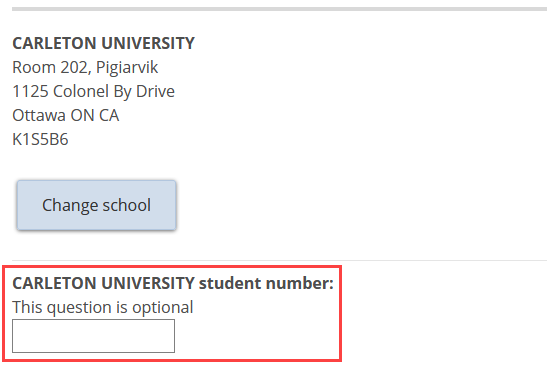
- You will be prompted to give your Carleton Student ID. It’s important to give your number here. Not providing your student number can cause delays in your application.
Step 3 – Select your program and study period
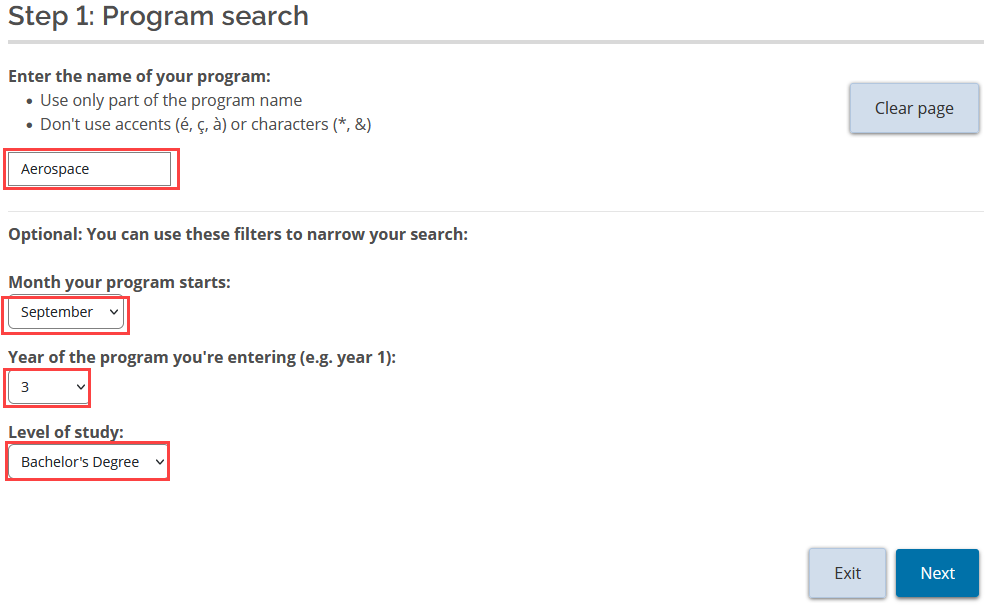
All of the questions on the following OSAP page are mandatory. Here are some tips to help you find what you are looking for quickly:
- Use the program search function to find and select the correct program and study period for your application.
- Use all of the optional filters to narrow your search results.
- For your program name, enter a single keyword (or at most two) to identify your major (e.g. “History”, “Aerospace”, or “Art History”, “Political Science”)
- Choose September as the month your program starts.
- Program year refers to your academic year standing.
Co-op study terms and work terms
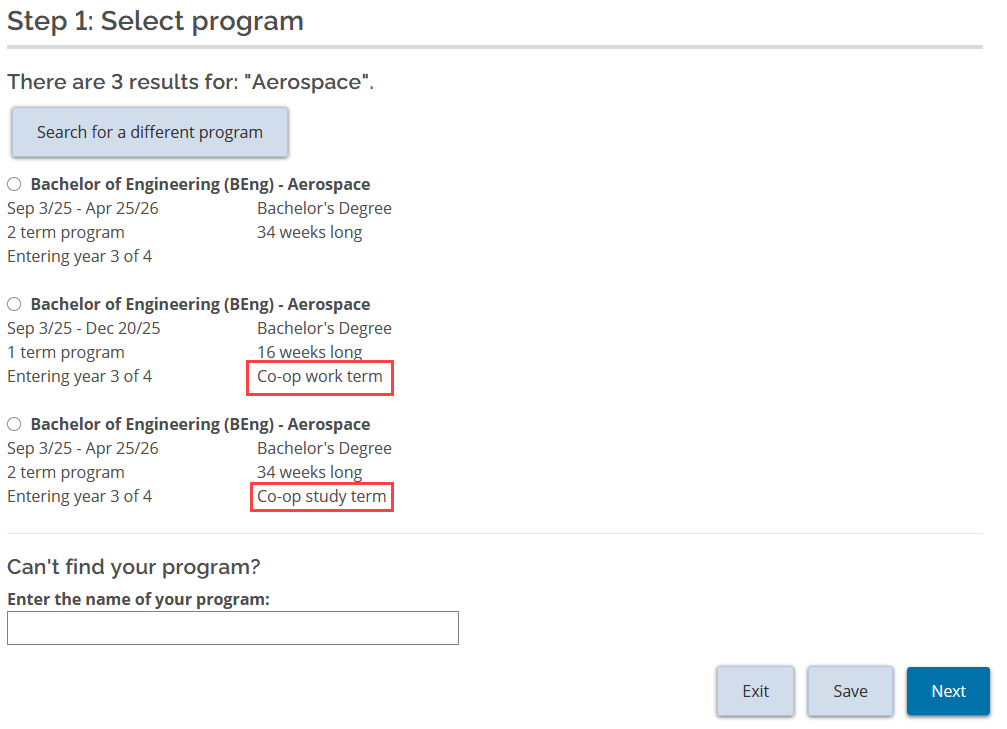
If you are in the co-op stream of your program:
- Choose the co-op study term option if you will be registering for a full-time course load.
- Choose the co-op work term option if you will be completing a work placement.
- If you will be completing a co-op work placement and taking a class, choose the work term option and send us an email so we can update your application to reflect your additional tuition and fee costs.
Percentage Course Load
Your percentage course load corresponds to the number of credits that you will be taking. Use the table below to find your course load percentage.
| Undergraduate Course Credits per term | Course Load | OSAP funding available |
| 2.0 or more credits | 100% | Full-time |
| Work Term | 100% | Full-time |
| 1.5 credits | 60% | Full-time |
| 1.0 credits | 40% | Part-time, or full-time for students with a permanent disability |
| 0.5 credits | 20% | Part-time |
Note
There is no such thing as an 80% course load during the fall/winter terms.
Step 4 – Complete and submit application
Review your application carefully before you submit it. If you need to make adjustments later, you will need to send us an email in order to get it corrected.
For a full list of deadlines view our dates and deadlines page.
Step 5 – Upload required documentation
You may need to upload documents to support your application. If so, they will be listed on the Print/Upload page of your online OSAP application. When you have them ready, scan them and return to the same page to upload them to your OSAP application. You should aim to get this done before fall classes get underway.
For all deadlines regarding your documentation, visit our dates and deadlines page.
Step 6 – Monitor your application
After you submit your application, monitor your Carleton email account for important messages from the Awards Office. And be sure to log in to your OSAP account regularly to check for unread messages in your OSAP Message Centre.