Understanding Accessibility Validation in cutheme
Table of Contents
Over the last several releases, we have continued to improve accessibility validation within cutheme. Some of these changes have introduced new checks, while others have improved existing validation to better identify accessibility issues before content is published.
As a result, some content creators may notice additional warnings, publishing restrictions, or validation messages that were not previously visible. While these validations may feel new, the accessibility requirements behind them are not.
Accessibility requirements are not new, and neither is our commitment to enforcing them. What has changed is our ability to identify issues earlier and provide more immediate feedback to content creators.
Summary of this post
This is an important topic so there is a lot to take in in this post. However, it can all be summarized as:
- Web accessibility is core to our efforts at Carleton
- We have had accessibility checkers in cutheme for some time now
- We have now enhanced these so you might have to correct your content more frequently
- Accessibility is there to make the lives of everybody easier
- Review the checks described below so you can tell why you cannot publish/save a page
You can also learn more on our Web Accessibilty website.
Accessibility Requirements Are Not New
Accessibility has been a requirement for Carleton websites for well over a decade. These requirements did not originate with cutheme, WordPress, Gutenberg, or the Enterprise Solutions & Integrations team.
What has changed is our ability to identify accessibility issues earlier in the content creation process.
Historically, accessibility issues were often discovered during manual reviews, audits, or after content had already been published. As cutheme has evolved, we have introduced automated validation that helps identify many of these issues while content is being created.
Our goal is to provide content creators with immediate feedback, reduce the number of accessibility issues reaching production websites, and make it easier to create content that meets accessibility requirements from the start.
Why We Continue to Add Validation
Accessibility validation is an ongoing effort. As new opportunities are identified, additional checks may be introduced to help content creators catch issues before publication.
In some cases, this means introducing validation for requirements that were previously reviewed manually. In other cases, it means improving existing validation to catch scenarios that were not previously detected.
For example, heading hierarchy validation has existed within cutheme for some time. More recent improvements expanded this validation to properly evaluate the first heading used within page content, ensuring that the existing rule is applied more consistently.
The requirement itself has not changed. The validation has become more accurate.
These Requirements Will Remain
Accessibility requirements are not optional and exceptions will not be made to bypass accessibility validation.
While we understand that validation may occasionally require additional effort when creating content, these requirements exist to ensure that our websites remain accessible to all users, including those who rely on assistive technologies.
For that reason, accessibility-related validation rules will not be removed simply because they create additional work or require content to be updated.
Why Can’t Accessibility Issues Be Ignored?
Accessibility requirements are only effective when they are consistently followed.
While some issues are presented as warnings, others can prevent content from being published until they are corrected. This approach helps ensure that known accessibility barriers are addressed before content reaches a live website.
The purpose of these validations is not to make publishing more difficult. They exist to help content creators identify and correct issues early, when they are typically much easier to resolve.
Finding Accessibility Issues in the Editor
To help content creators address issues quickly, accessibility validation is built directly into the editing experience.
Reviewing Issues on Individual Blocks
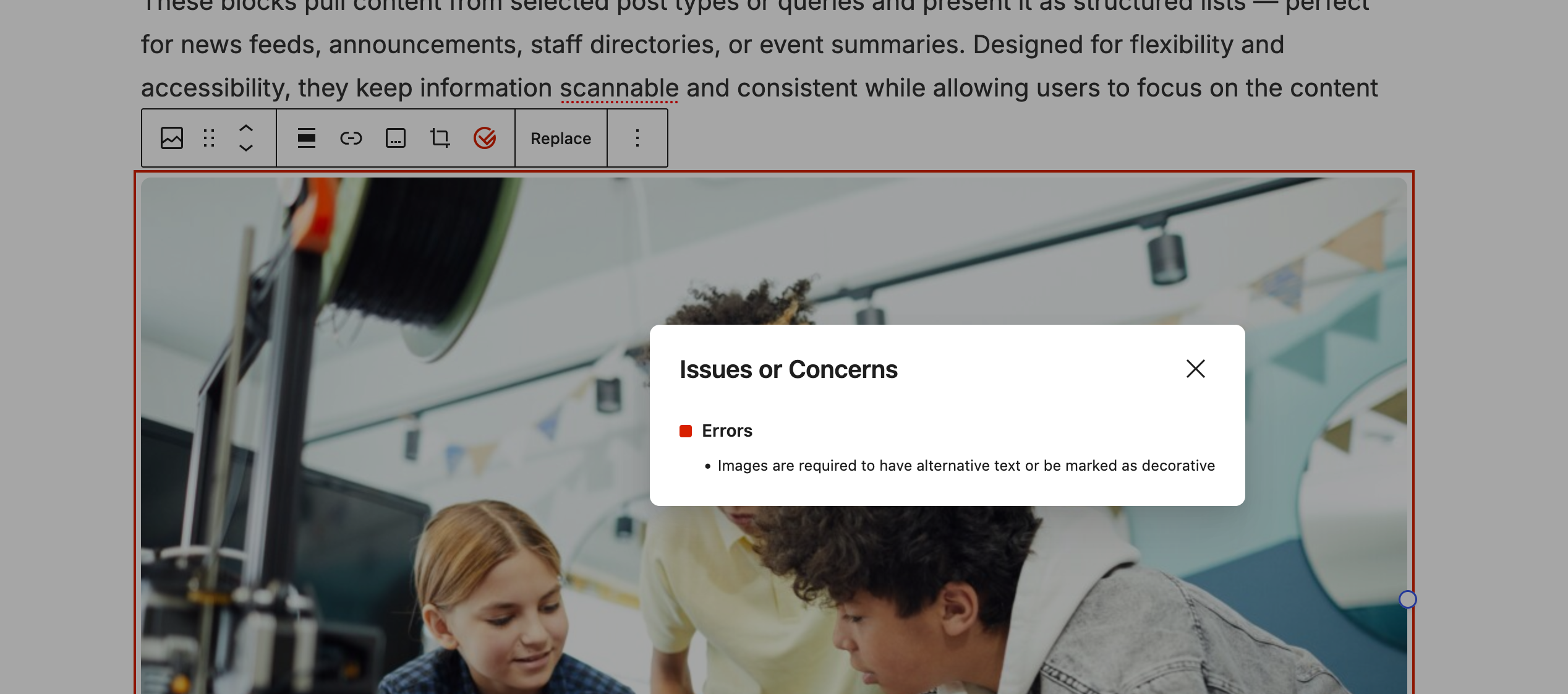
When a block contains an accessibility issue, it will be highlighted with a coloured outline:
- Red indicates an error that must be corrected.
- Yellow indicates a warning that should be reviewed.
Selecting the block will reveal a red or yellow accessibility icon in the block toolbar. Clicking this icon displays detailed information about the issue or issues associated with that block.
Reviewing Issues Across the Entire Page
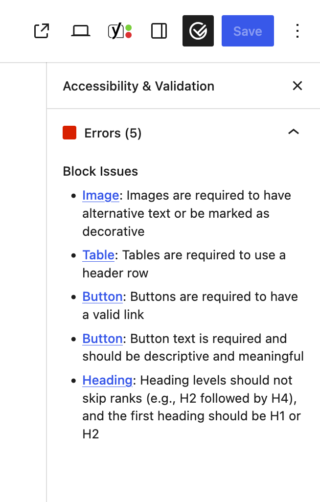
For a top-down view of accessibility issues across an entire page or post, click the red or yellow accessibility icon located in the upper-right corner of the editor, near the Save or Publish button.
This panel provides a consolidated list of accessibility issues identified throughout the document and allows you to quickly navigate to the affected blocks.
Common Accessibility Validations
The following list highlights some of the accessibility validations currently performed within cutheme. This is not a complete list and may change as new validation is added.
Headings
- The first heading in page content must be an H2.
- Heading levels must not be skipped.
- Consecutive heading hierarchy must be maintained.
Images
- Most images are required to have alternative text
- However, an option to mark as decorative is available
- Image alternative text should not exceed 125 characters in length
- The images alternative text and caption should not match
- Alternative text will be checked for generic patterns such as “A picture” or “An image”
Buttons
- Buttons are required to have text and a link
Table
- Tables are required to have a heading row
Content Titles
- Pages, posts and other custom post types are required to have a title
We Welcome Feedback
While accessibility requirements themselves are not negotiable, we are always looking for ways to improve the authoring experience.
If validation messages are unclear, difficult to understand, or lack sufficient guidance, we want to hear from you. Feedback helps us improve error messaging, documentation, training materials, and the overall workflow for content creation.
Many of the improvements introduced over the last several releases have come directly from feedback provided by content creators. That feedback continues to help us refine both the validation system and the supporting documentation around it.
Our goal is not to make publishing more difficult. Our goal is to help content creators identify accessibility issues earlier, provide clearer guidance on how to resolve them, and ensure that the content published on Carleton websites remains accessible to everyone.