Heading
Basic Training Module 3: Essential Blocks
Headings are used to organize content into sections and make pages easier to read. They help visitors quickly scan a page and understand how information is structured.
Headings also play an important role in accessibility, allowing screen reader users and other visitors to navigate content more effectively.
Think of headings as the outline of your page. Just as a document uses titles and section headings to organize information, web pages use Heading blocks to define content structure.
When to Use a Heading Block
Use a Heading block whenever you want to introduce a new section of content.
Examples include:
- Section titles
- Topic headings
- Subheadings
- Frequently Asked Questions
- Content categories within a page
Headings should be used to organize information, not simply to make text larger.
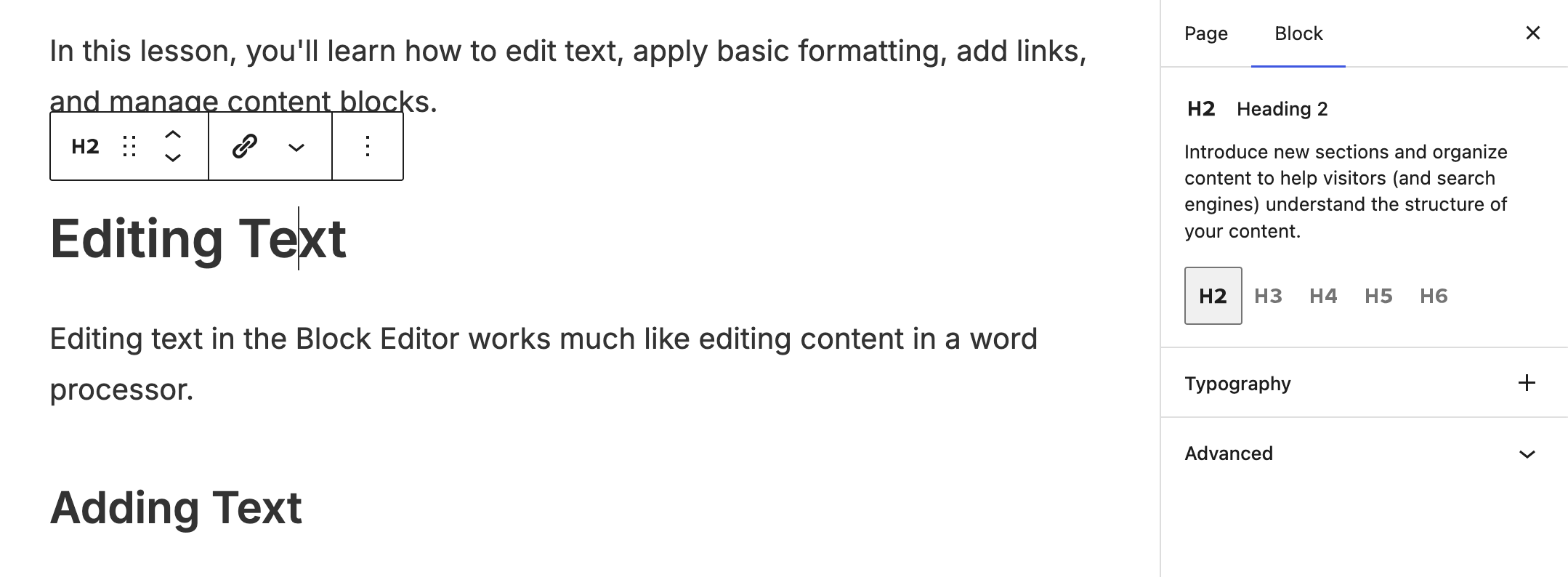
Adding a Heading Block
To add a Heading block:
- Click the + button and search for Heading.
- Select the Heading block.
- Enter your heading text.
You can also type: /heading and select the Heading block from the list that appears.
Understanding Heading Levels
Headings are organized using levels.
The most common heading levels used in cutheme are:
- Heading 2 (H2)
- Heading 3 (H3)
- Heading 4 (H4)
Think of heading levels as a hierarchy.
Example:
H2 Programs
    H3 Undergraduate Programs
        H4 Admission Requirements
    H3 Graduate Programs
        H4 Application Process
A lower-level heading should always relate to the heading above it.
Choosing the Correct Heading Level
In most cutheme pages:
- The page title serves as the main heading.
- Content sections begin with H2 headings.
- Subsections use H3 headings.
- Additional levels use H4 headings.
Avoid skipping heading levels whenever possible.
Good Example
H2 Services
    H3 Student Services
    H3 Career Services
Avoid
H2 Services
    H4 Student Services
Using headings in sequence creates a clear and accessible document structure.
Best Practices
Use Headings to Organize Content
- Break long pages into logical sections using headings.
- Visitors often scan pages before reading them in detail.
Keep Headings Descriptive
A heading should clearly describe the content that follows.
Good Examples:
- Admission Requirements
- Contact Information
- Frequently Asked Questions
Less Helpful Examples:
- More Information
- Details
- Click Here
Don’t Use Headings for Styling
If you want larger text, use formatting options provided by your site’s design system.
Choose heading levels based on content structure, not appearance.
Keep Headings Concise
Most headings should be short and easy to scan.
-
Welcome to getting started with cutheme, module 3. This video is going to explain how to use the heading block.
Headings are useful for splitting your content into subsections which makes it accessible, scannable, and logically organized.
To add a heading block, select it from the block menu. Then just type in your heading.
You can change the heading level by clicking the current heading which is H2 by default. And then you can select a new one.
Headings should be nested meaning that they need to start with the highest level – H2 and put any subheadings as progressively smaller levels – H3, H4 Etc.
You can also adjust the alignment of a heading by clicking on this icon and selecting a different alignment, such as align center.
Try It Out
Practice organizing content using Heading blocks.
- Add a Heading block to a page.
- Create a Heading 2 titled “Programs”.
- Add two Heading 3 blocks beneath it.
- Add a Heading 4 beneath one of the Heading 3 sections.
- Review the hierarchy to ensure the headings are properly nested.