Information for New Undergraduate Students
Welcome to Carleton University! We have put together a list of tools designed to help new first-year students, like yourself, with their registration.
Before you begin your studies, you will want to review these helpful guides.

Your Registration Checklist
To help you prepare for your first year, we have produced a new student checklist of all the things you need to know.

First Year Course Selection Guides
Each degree program at Carleton University has a unique set of courses for you to take in your first year. Be sure to consult youguide before registration begins.

Know the Rules
To have success at the university level, it is important that you understand and follow the regulations that apply to your program. The Undergraduate Calendar is the University’s official source of rules & regulations.

Dates and Deadlines
Always be mindful of the academic and financial dates and deadlines for each academic term.

Registration Terminology
Registration has its own terminology. We have provided some definitions to help you understand some of the terms you may come across when registering.

Timetickets
Your timeticket indicates when the registration system first opens for you. Knowing your timeticket will help you plan your registration.
These tools will help you have a smooth registration.

Registration Steps
All registration for courses is done through Carleton Central. There are 4 steps to registration which must be completed in order to ensure your successful registration.

Waitlisting
While we strive to provide students with access to courses, factors such as room size can limit the number of spaces available in a course. For courses that are currently full, you may be able to join a waitlist.

Registration Override Request
When attempting to add a course, you may encounter a registration error. This happens when you do not meet the registration criteria set out by the department.

Course Delivery Types
Course sections may be offered in-person, online or as a combination of in-person and online activities. The delivery type for each course will appear in the “Section Information” listing in Carleton Central.

Block Registration
Some programs have many (or all) of their first-year courses pre-selected for new first year students. This is called Block Registration, and we have a page dedicated to providing you with more information.

Access to Courses
Academic departments may restrict certain courses to a particular year level or degree program. If this happens, you may received a registration error or other message in Carleton Central.
Things for you to consult after your registration.
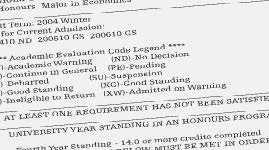
Academic Audit
The academic audit can help you see where your classes are being used in your degree requirements. Be sure to refer to this throughout your academic career.

FAQs
We have a list of FAQs dedicated to the first year registration experience.

Registration Support
If you still have any questions after looking through the information on this website, we have several services available to help you out.