Managing Exam Accommodations
Instructors and Scheduling & Examination Services (SES) share the responsibility for the provision of test/exam accommodations to students with disabilities at Carleton.
Table of Contents
McIntyre Examination Centre (MEC) – Scheduling & Examination Services
The McIntyre Exam Centre (MEC), a division within SES, provides a range of in-person and online exam services to help course instructors with the accommodation of students registered with PMC and Equity Inclusive Communities (EIC).
MEC offers a range of exam accommodation services for in-person and online tests and exams including, but not limited to:
| In-Person Accommodations | Online Accommodations |
|
|
Uploading Test or Exam to Ventus
Once your NOE has been processed (i.e., once you have received an email from Ventus confirming the addition of an NOE), you can submit exam materials. Exam materials may be submitted via the MEC Exam Upload Form. The upload form can be found on our intranet or via the Faculty Portal by following the steps below.
- Log in to the Ventus Faculty Portal which will bring you to your Class List for the current semester.
- From the Class List, click on the course for which you have created an NoE.
- On the Course page, to the right of the NoE listing you created, click the blue “View” button.
- On the Notice of Examination screen, navigate to the section titled “Submit Exam Materials” and click the link MEC Exam Upload form.
Exam Accommodations Summary
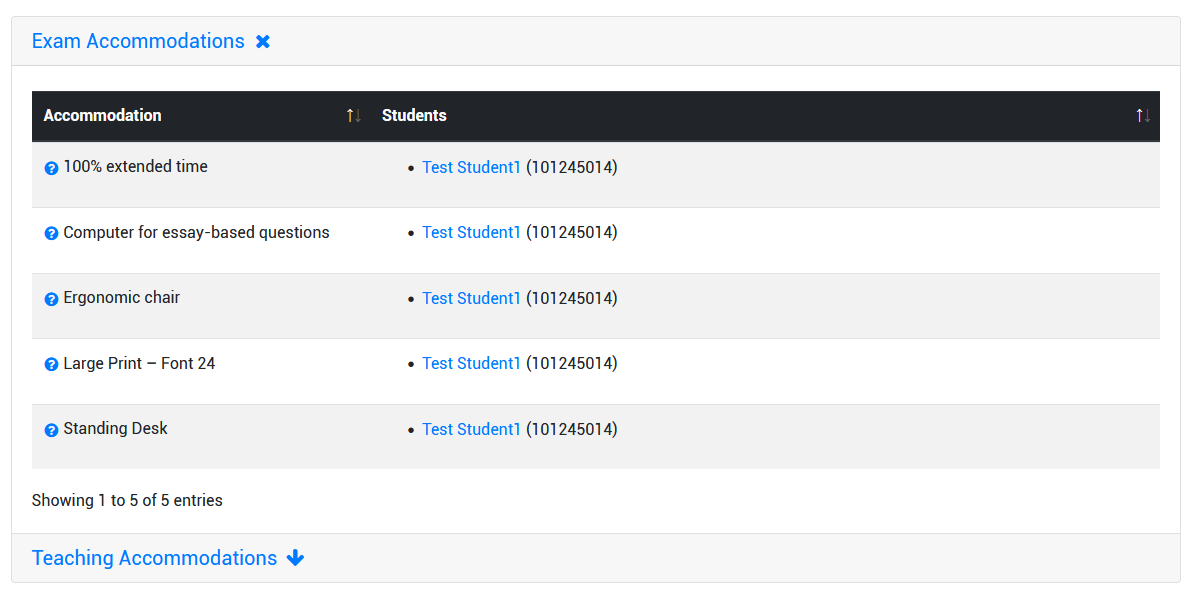
Below the NoE section of the Course page, you will see a summary of the accommodations required by students for the relevant course (PMC and SES are available to assist you with providing some of these accommodations). Clicking on either the “Exam Accommodations” heading will drop down a list of all (test and exam) accommodations requested by PMC students enrolled in your course. Clicking on the blue question mark icon next to each accommodation will pop up a description of that accommodation. The following example shows the list of exam accommodations requested by Test Student 1:
Services for IN-PERSON In-Term Quizzes, Tests or Midterms
In-person services include…
- Reserved space/seats for your PMC students that meets their accommodation needs
- Printing and distribution of exam materials
- Invigilation
- Delivery of the completed assessment to your academic department the following business day after it is written
Requests for in-person services can be made by submitting a Notice of Examination (NOE) through the Ventus Faculty Portal. Course Instructors are encouraged to submit NOEs for their term exams and assessments early in term. The deadline to submit an NOE is outlined in the Examinations Memo sent to all course instructors by Scheduling & Examination Services (SES) before the term. MEC will accept NOEs after this deadline but a late fee may be charged to the department. NOEs received within 10 business days of the exam date are subject to space and proctor availability.
Please note: Only one (1) MEC service request is needed for each test/exam. You are encouraged to submit an NOE even if you do not yet have any students with active exam accommodations. For questions about MEC services, please email us at ExamRoom.
Services for IN-PERSON Formally Scheduled Final, End-of-Term or Deferred Exams
The same in-person services are available for formally scheduled final, end-of-term or deferred examinations; however, the process is different. You are not required to submit a test booking via the Ventus Faculty Portal. Please refer to the Final Examination Memo that you will receive once the formal exam schedule has been released.
Services for ONLINE In-Term Quizzes, Tests, or Midterms
SES can assist with applying and updating extra-time accommodations for PMC students writing online or in-person digital Brightspace exams. To request this services please submit your test information through the Ventus Instructor Portal and select “Digital – Brightspace” as the exam format when prompted. Requests for this service must be made by the accommodated exam request deadline as outlined in the Examinations Memo.
For information on other online exam services such as exam building and review, please refer to the Examinations Memo.
Services for ONLINE Formally Scheduled Final, End-of-Term or Deferred Exams
The Online Exam Building Support and Online Accommodation Support are available for formally scheduled final, end-of-term, or deferred exams. The process to request these services is different. Please refer to the Final Examination Memo that you will receive once the formal exam schedule has been released.
No Service Option: If you prefer to setup PMC accommodations on your own, TLS offers support for instructors using Brightspace, including specific instructions for setting accommodations for tests/exams.
Exam Support
Scheduling and Examination Services provide on-call and online exam support for in-person and online exams. For information on exam support services please visit the Exam Support page on the SES website.