As of Fall 2021 the SCS course material submission is no longer required
How to submit your course material using Nextcloud
What to include in your course material uploads
When to submit your course material
Verification
Making changes to your upload
When you are done: Leave this share
Information about SCS Nextcloud
The School of Computer Science requires all instructors to submit their course material for every course they have taught.
NEW!!! Starting from Summer 2021 onward course material submissions are done using SCS Nextcloud
How to submit your course material using Nextcloud
Log into SCS Nextcloud:
and you should see a shared course-material folder with your course-year-term as the folder name. When the folder was shared you should also have received an email notifying you of the course material share on Nextcloud. Simply upload all your course material into the shared pre-created folder. That’s it!
Don’t have an instructor SCS Nextcloud account? Contact the SCS Tech staff!
What to include in your course material uploads
- Course outline,
- Course slides and notes,
- Tutorials,
- Tests & solutions,
- Midterms & solutions,
- Final Exam & solutions,
- Assignments & solutions.
You DO NOT have to upload large video files!
When to submit your course material
Please submit your course material for your current course before the start of the next term. If there is a reason why you can’t submit your course material in a timely fashion please contact the SCS admin staff.
Verification
The folder will be shared by user ‘Course Material’. You should also have an email notifying you that your course material Nextcloud folder has been shared with you. You can hover over the share-owner account and it should display the shared-owner:

Making changes to your upload
You can log into Nextcloud anytime and change the contents of your course material folder.
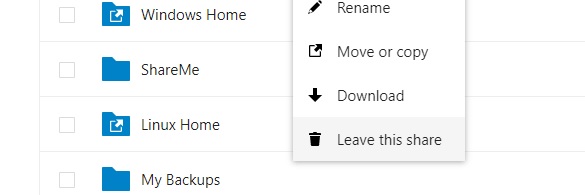
When you are done: Leave this share
When you are sure you are done you can ‘leave’ the folder share: right click on the folder and select ‘Leave this share’