Degree Requirements
Table of Contents
myAudit is divided into sections such as graphs & charts, summary of program requirements, major, minor, concentration or specialization, and electives. This allows you to view and understand which parts of your degree you have completed and which parts you still need to complete.
Year Standing
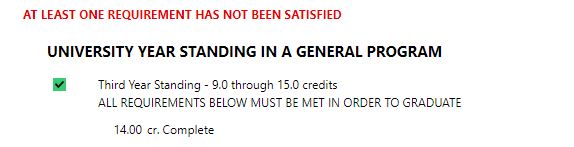
Year standing is found near the top of myAudit underneath the charts and graphs. It is based on the number of credits you have completed successfully that are being applied to your degree. It is updated regularly as final grades are posted and you can view it on myAudit below the graphs and above the ‘Summary of Degree Requirements’ section.
Year standing is based on the following credits:
First Year: Fewer than 4.00 credits
Second Year: 4.0 through 8.50 credits
Third Year: 9.0 through 13.50 credits
Fourth Year: 14.00 or more credits (only for students in 20.00 credit degree programs)
If you are in a degree program that only requires 15.0 credits (ex. Bachelor of Economics), you cannot achieve 4th year standing.
As well, if you have not met all of your requirements for graduation (meaning, you are still in progress to complete your degree), you will see ‘AT LEAST ONE REQUIREMENT HAS NOT BEEN SATISFIED” highlighted in red.
Summary of Program Requirements
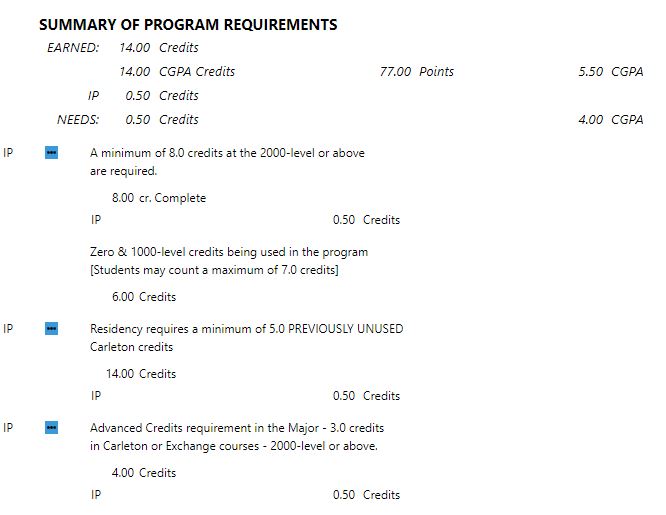
This section gives a basic summary of your degree including, credits you have earned, credits in-progress, remaining credits, credits completed towards a specific year level and overall CGPA. The IP on the left-hand side indicates that those specific requirements are “In Progress” and you are working towards completing them.
Major Requirements
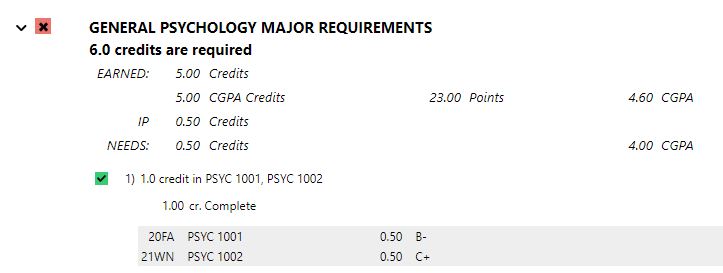
Next you will see your major course requirements. This allows you to see what courses are specific to your major that you need to take in upcoming terms, as well as the requirements that you have already fulfilled in that section.
Any sections highlighted in red with an “X” indicate that those requirements have not been completed. Therefore, you will be unable to graduate unless you fulfill them. If a section is highlighted in green with a check mark, it indicates that the requirements have been met.
Minor/Concentration/Specialization Requirements
If you have program elements such as a minor, concentration, or specialization, these will also appear in a section of your myAudit. This allows you to see which courses are required to complete those elements. Since there may be many course options in these categories, you may wish to meet with your program advisor to review them.
Again, if there is an ‘X’ highlighted in red beside the requirement, it means you still have not met the requirements of that minor/concentration or specialization.
Electives
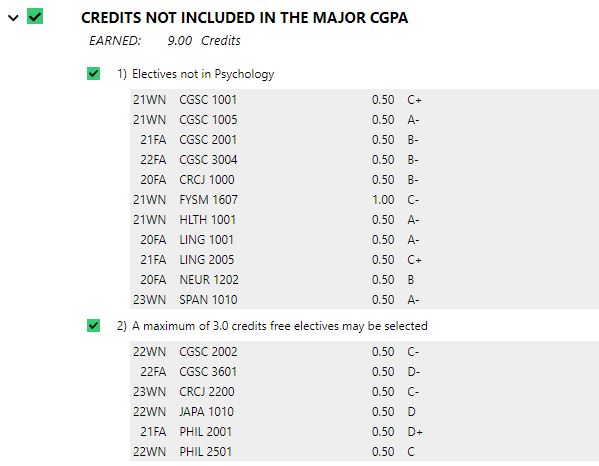
Elective credits are required for most degrees. You will have some choices about which courses you take but most courses in this category are NOT in your major field of study. Free electives are elective courses that are your own choice and can include extra courses that are in your major discipline.
Summary of all Courses
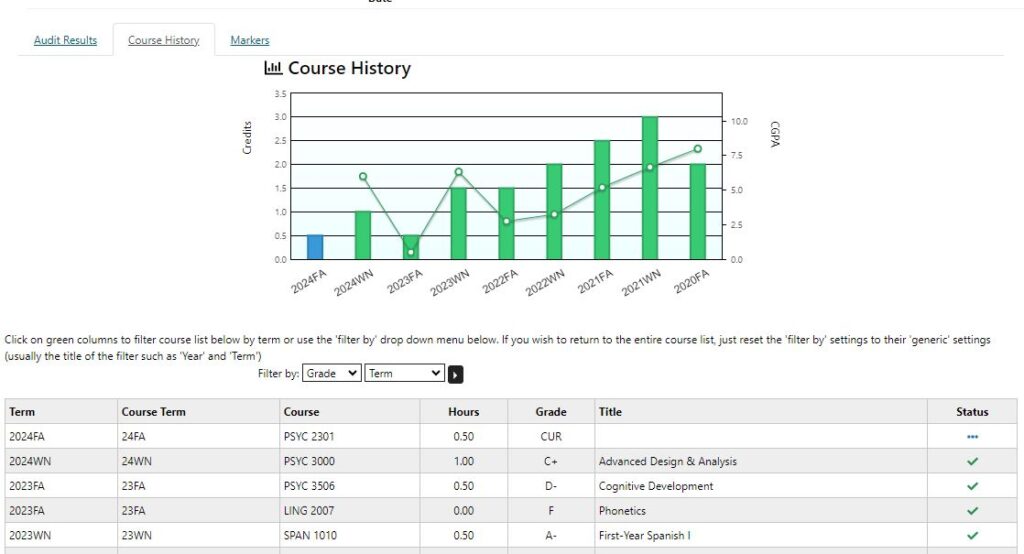
Click on the tab in myAudit that says “Course History”, it lists all of the courses that you have taken, chronologically, term by term. You can also filter the results by grade or term.
Courses Set Aside
This section of myAudit will list any courses you have previously attempted that DO NOT count towards your degree. These courses do not count towards your CGPA or graduation and can be set aside for different reasons, which include:
- Your lowest graded attempt(s) of a repeated course will be listed here
- A course you have taken which precludes another one that is already counting in your degree
- Extra classes that you have completed beyond the required amount of courses for your degree
- Extra 1000-level courses, if you have exceeded the maximum of number of 1000-level courses
- Courses that have ‘no credit’ value in your degree (these courses are all listed in the Undergraduate Calendar)
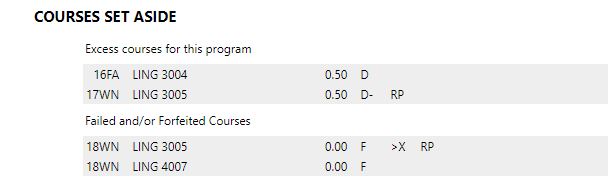
Excess Courses for This Program-Failed and/or Forfeited Courses:
These are courses that no longer count towards your degree. This can happen if you have repeated a course, as the original attempt and grade will be forfeited. A precluded course will also appear in the forfeited section. This means if you take a course that precludes another (meaning they have similar content), you will be credited for the most recent course attempt. If you have courses listed under this section and need further details, contact us via our online form.
Breadth Requirements
The breadth requirement is part of most Bachelor of Arts* degree programs. Its purpose is to allow you to engage in a variety of topics so you receive a well-rounded arts education.
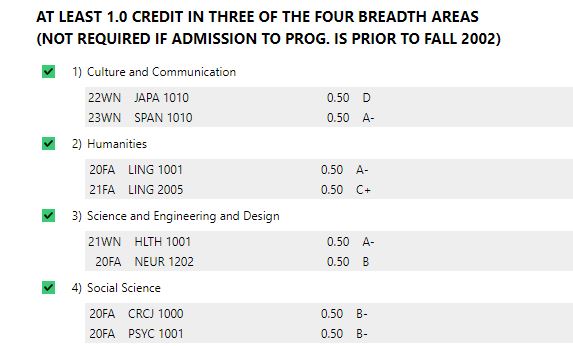
You will need to complete at least 1.00 credit in three of the four breadth areas, which include:
- Culture and Communication (includes: COMS, ENGL, FILM, etc.)
- Humanities (includes: HIST, PHIL, RELI, etc.)
- Science, Engineering, and Design (includes: COMP, ERTH, MATH, etc.)
- Social Sciences (includes: PSYC, SOCI, ECON, etc.)
If you are unsure if you require the breadth requirement, check myAudit. It will list all of the requirements you have left, as well as break down the courses into categories so you can see which ones you still need to fulfill.
For more information about majors exempt from the breadth requirement or to view what subjects are acceptable under certain categories, please visit the undergraduate calendar.
*Different Breadth requirements may be listed for programs not included in the Bachelor of Arts, so if you have any questions contact your Program Advisor.
Transfer Credits
When courses are evaluated for transfer credit students may receive one of three possible decisions.
- The course may be evaluated as ‘no credit’ which means that the course is not equivalent to any course offered at Carleton.
- The course may be assigned a generic credit. For example an English course taken at another institution may be given an evaluation of ENGL 1XXX. This means that the course is equivalent to a first year university level English course but does not correspond exactly to any of our first year English courses.
- The course may be given an exact equivalency to a Carleton course. If you have questions about the transfer credit you were awarded or you wish to have a course evaluated again please contact Admissions Services at admissions@carleton.ca
- If you have received either no credit or a generic credit for courses you have taken at a previous institution you may appeal to have the course evaluated again. You may only submit this petition if you have new and detailed information about the course that was not presented during the first evaluation.
If you would like to review your academic progress with an Advisor, contact us to book an appointment!