How to read myAudit
Your customized audit called ‘myAudit’ is available to view via Carleton 360. The first step after logging in to either of these portals is to click on the MyAudit link. This will allow you to submit an audit and then you can view it online.
The structure of myAudit will differ depending on your degree program. Some are divided into year-by-year requirements, some are divided into program elements requirements.
Here are some general guidelines for most degrees:
Summary of Your Progress
myAudit offers charts and graphs that allow you to quickly view your progress towards graduation to see your remaining requirements and your CGPA(s).


Your requirements are broken down into sections. (i.e. major, minor, electives) so you can see the progress you have made in each individual section.
The green colour indicates the requirements you have already met. The blue colour is the courses that are currently in progress and the red colour indicates the requirements that still need to be met.
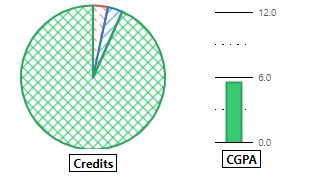

Use your mouse to hover over the pie chart and see your credit count and remaining requirements. Then hover over the bar graph and your overall CGPA will appear (as above).
Residency Requirement:
Located under the ‘Summary of Program Requirements’ this tells you how many Carleton credits you need, or have to complete in order to graduate. You must complete at least 5.0 credits at Carleton in order to graduate.
This is particularly important information for students who have transfer credits from a different university or earned credits from a previous degree. When returning for a second Carleton degree, you need a minimum of 5.0 credits that were not used toward the first degree.
Zero & 1000-Level Course Maximum:
Carleton students are only allowed to count up to a maximum of 7.0 credits of Zero & 1000-level courses towards their degree.
Proceed to the Degree Requirement page for more information about myAudit.
It is recommended that you review your specific program requirements with your Program Advisor or Academic Advising Centre Advisor once admitted to a new degree program.