Copilot Chat
A generative artificial intelligence service, provided through a chat interface. It is an easy to use way to get answers to questions, analyze documents, and generate text and images. When used with a CUNET account chats are secured under Enterprise Data Protection, preventing them from being used to train the AI and permitting analysis of Carleton files.
Table of Contents
Introduction
Microsoft offers a Generative AI (GenAI) product called Copilot. It uses web data along with any files you upload in the session to synthesize responses to your questions or directions, in a chat interface. Due to it’s constant development and underlying technology, the output should be checked for accuracy before being used. Remember that it is a “copilot”, but that you are the one steering and making decisions with the result.
Copilot is offered for free to the general public in Microsoft’s Edge browser and on the web. That free cost is in exchange for the chat conversation and interactions being used by Microsoft to enhance Copilot. This is not the case when using Copilot while signed in using your CUNET account. When accessed in such a way your chats and files are protected under the Enterprise Data Protection agreement Carleton has with Microsoft.
Accessing Copilot Chat
Copilot Chat can be accessed directly on the web at copilot.cloud.microsoft/chat
The work-specific Microsoft 365 Copilot app can also be installed from the Microsoft Store. If prompted to “Allow this site to open…with Microsoft Store?” please select Open Link.
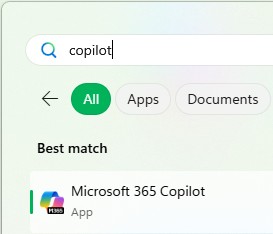
The app will then be available through the Start menu:
Carleton Resources
AI Framework
At Carleton, the responsibility for AI initiatives is collaboratively managed by Teaching and Learning Services (TLS), Information Technology Services (ITS), the MacOdrum Library, and the Office of the Vice-President (Research and International) presented through the AI Hub.
Microsoft Copilot is Carleton’s only approved GenAI platform. It has successfully completed the University’s Data Protection Risk Assessment process, and it offers Enterprise Data Protection, meaning that AI chat sessions will not be stored or used for training. For more information please visit Carleton’s AI Data Protection page.
Enterprise Data Protection
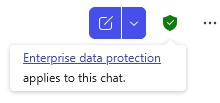
When using Copilot with your CUNET account, look for the green shield icon at the top-right corner that indicates Enterprise Data Protection is enabled.
Prompting
In GenAI prompts are the messages, back and forth, that you create in the chat interface. Along with context like links or documents, they are the main way of providing information to Copilot. Just like having a conversation with a coworker, you need to set all the information out in the open so that a good result will develop.
A good prompt includes the following parts: Context, Goal, Source, Expectations.
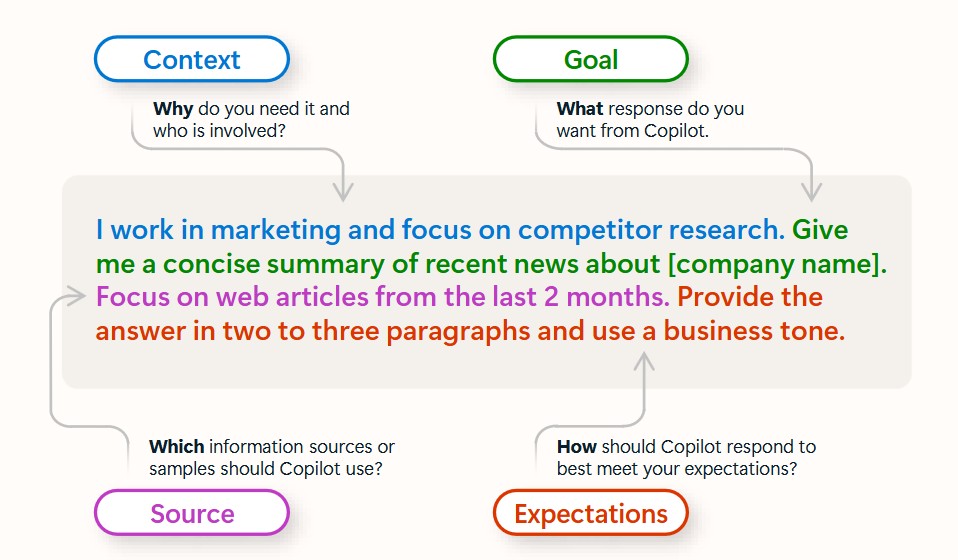
Read more in Recommended Prompts for Microsoft 365 Copilot published August 2025 by Microsoft.
Microsoft Resources
What is the Microsoft 365 Copilot app?
Get started with Microsoft 365 Copilot Chat
Get started with Search in the Microsoft 365 Copilot app
Ask questions and get answers using Microsoft 365 Copilot Chat
Catch up on things quickly using Microsoft 365 Copilot Chat
Create content using Microsoft 365 Copilot Chat
About Copilot Chat responses
Microsoft Training
Learning Path:
Transform ideas into action with Copilot Chat (Basic)
This course teaches learners how to get started with Microsoft 365 Copilot Chat (Basic), craft effective prompts, and use its AI-powered features to enhance productivity, streamline work, and collaborate securely in real-time.
Modules in Learning Path:
Get started with Microsoft 365 Copilot Chat (Basic)
This module introduces Microsoft 365 Copilot Chat (Basic) as a secure, AI-powered assistant that boosts productivity by applying web-based insights, while guiding you on how to access it, navigate the interface, and start using it effectively.
Write effective prompts to achieve optimal results
This module teaches you how to write clear, effective prompts for Microsoft 365 Copilot Chat (Basic) by exploring key elements, best practices, and the Prompt Gallery to help you achieve optimal results.
Work smarter with Microsoft 365 Copilot Chat (Basic)
This module teaches you how to use Microsoft 365 Copilot Chat (Basic)’s AI-powered features to enhance productivity, collaborate in real time, and streamline work within a secure, enterprise-ready environment.
Peer University Resources
University of Toronto Centre for Teaching Support & Innovation:
Microsoft Copilot Chat
York University UIT:
Artificial Intelligence (AI) Microsoft Copilot
University of British Columbia UBC IT:
Microsoft M365 Apps, Microsoft Copilot