Planner
A web service that allows project tracking. Create deliverables and tasks to track your project’s milestones. Display progress using a grid with hierarchy, or through a Kanban board. Access it on the web or directly from Teams.
Table of Contents
Accessing Planner
The main way to access Planner is through its website planner.cloud.microsoft.
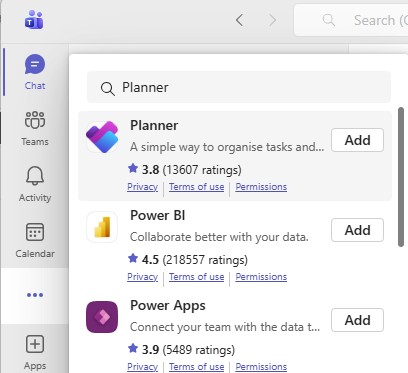
A Planner app can be added and pinned to the Teams app bar for quicker access:
- In Teams navigate to the three-dot “View more apps” menu, and search for Planner. Then click “Add” to install the Teams app.
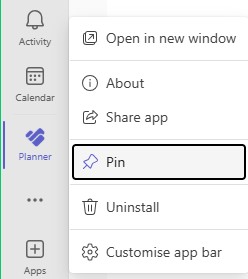
- Teams will open the Planner app once it is installed. If you would like to keep it showing in the Teams app bar, right-click Planner and select Pin
Carleton Resources
Under development
Microsoft Resources
Under development
Microsoft Training
Under development