If your instructor has used the comment feature in cuPortfolio to add comments to your portfolio, once your portfolio has been graded, you can view these comments by following these instructions:
- Login to cuPortfolio
- Using the main menu, click on ‘Create’ and then click on ‘Portfolios’.
- Click on the checkbox next to ‘Show submitted portfolios’ and then click ‘Search’.
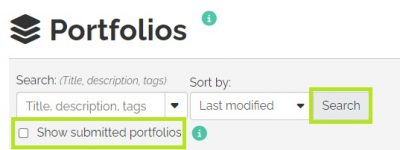
- Your portfolio will be bright green in colour and you can click on the title of it to view it.

- When you scroll to the bottom of each page in your portfolio, click on the comments bar and it will expand to show you the contents.

Was this page helpful?
1243
dd35045aba
no one has found this useful yet.