- Passwords
- Create a secure password or passphrase
- Multi-factor authentication
- Password Managers
- Tips to protect yourself:
- Learn more
- Get help
Passwords
Passwords and passphrases are the most common method of authentication we’re familiar with. Often, passwords are still used as the only authentication method to access online accounts. Because of this risk, it’s crucial to have a strong password or passphrase that’s unique to each resource.
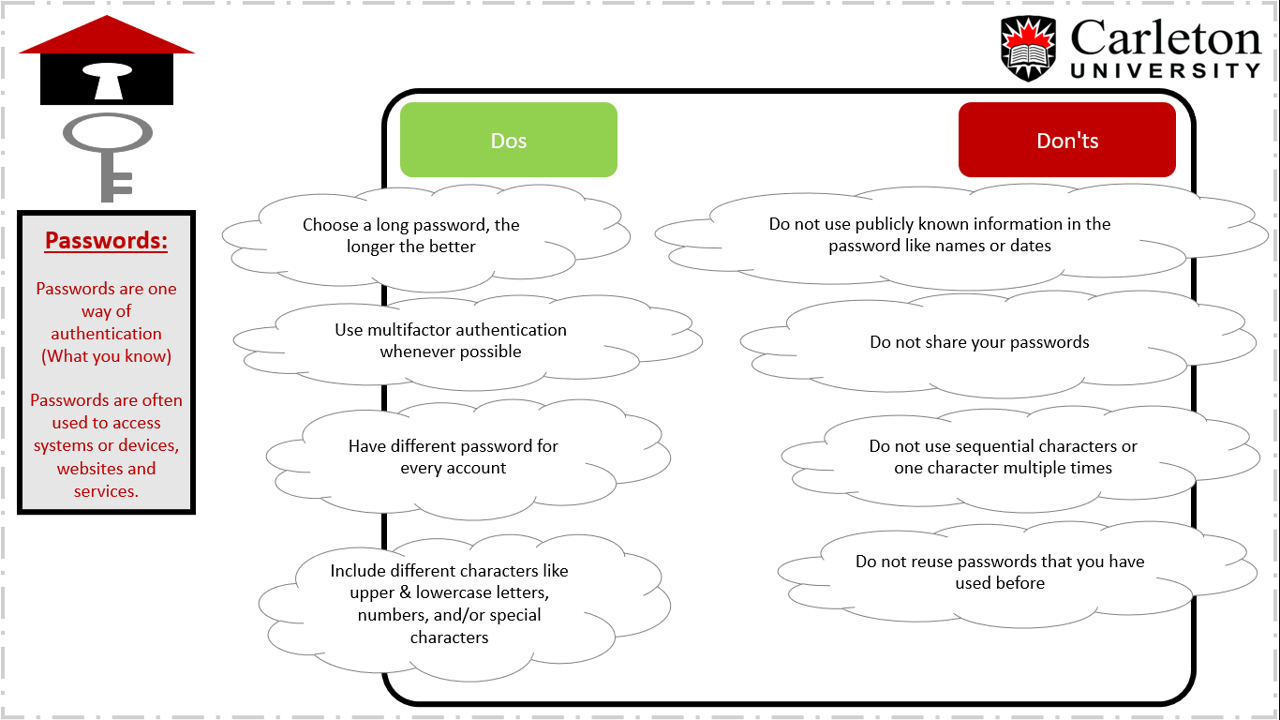
What to do and not to do regarding passwords
Create a secure password or passphrase
There are two key factors making a strong password, complexity and length. While a complex password might seem harder to guess, they tend to be shorter to be able to memorize. On the other hand, passphrases are longer in length and have proven to be more effective compared to the complex passwords and are easier to remember.
Creating a passphrase is simply creating a phrase as your password, which is easy to remember and hard to guess. Add complexity to it by substituting a few letters with numbers or characters to make it even stronger.
A sample passphrase might be: “The Brown Fox Jump$ Ov3r The Lazy Dog!”
This example contains 38 characters, and mix of upper-case, lower-case, numbers and special characters.
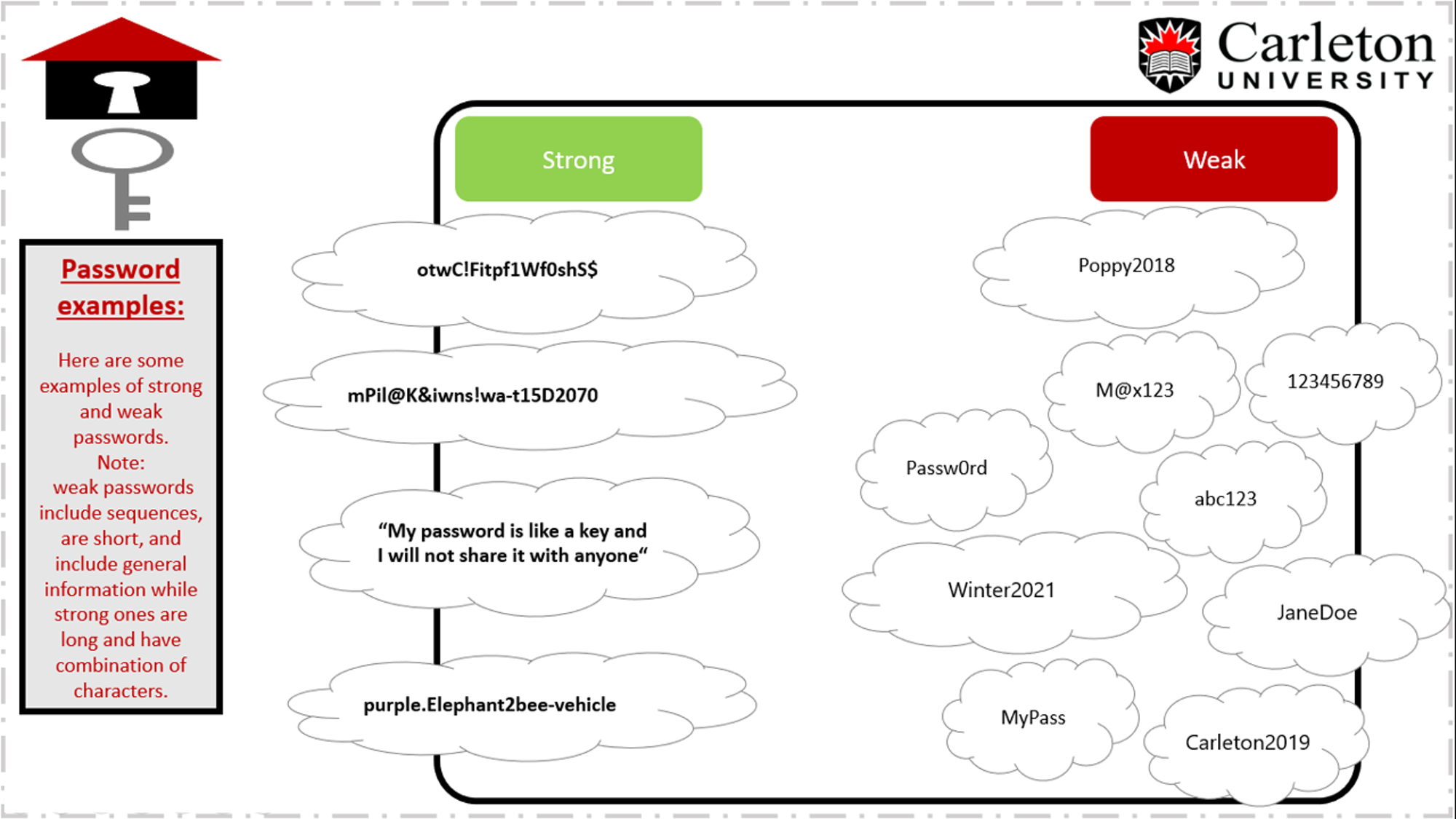
Password examples (strong versus weak)
Multi-factor authentication
Multifactor authentication (MFA) adds an additional layer of protection to passwords and passphrases by requiring a secondary factor that cannot be easily compromised. Using a combination of two or more methods like a password with an authenticator app, key fob, or biometrics (your fingerprint and/or face) dramatically reduces the risk of losing access to your accounts, making them more secure.
MFA options are increasingly available, but not always obvious. Take the time to review the settings of your social media accounts, and other online services to find and enable MFA options. This simple step can go a long way in protecting your privacy and access to your sensitive information.
Password Managers
It’s impossible for anyone to remember unique passwords for every service and account online. Using a password manager solves this problem. These tools will store and retrieve your passwords security, and conveniently. Most also have the ability to generate secure, complex passwords or passphrases for you, to make signing in to services quick and easy, from any device you own.
Tips to protect yourself:
- Have a unique password for each account, website or cloud service that you use.
- Use a password manager to securely store, retrieve and generate new passwords.
- Enable multifactor authentication (MFA) whenever possible.
- Choose a long password or passphrase that includes a variety of uppercase and lowercase letters, numbers, and special characters
- Do not use sequential numbers, important dates, or information other people might know or be able to guess about you.
- Do not share your password with anyone.
- Be mindful of using passwords on public devices, or any device that you do not own.
- Sign out from devices or web sites when you are no longer using them.
- Immediately change your password if you suspect it might be compromised.
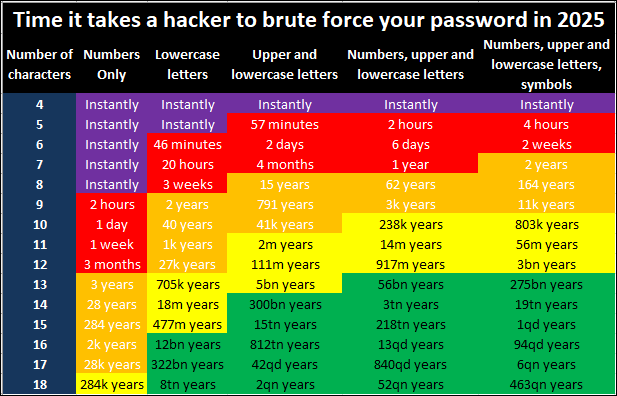
Learn more
Want to learn more about passwords and how to be more cyber secure at work or at home?
- We have interactive courses on cybersecurity awareness in Brightspace
- Explore Get Cyber Safe, a national awareness campaign offered by the Government of Canada
Get help
If you forget your password or think your account has been compromised, please contact the ITS Service Desk for assistance.