Duress Button Program
Campus Safety Services is committed to the safety of the Carleton University community and the security of all campus facilities.
Duress Button Program
This program is coordinated through the completion of a Physical Security System Application and assessment of your workspace.
The purpose of carrying out an assessment is to provide recommendations to consider measures necessary for the safety and health protection of a workspace.
-
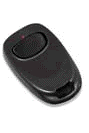
It is a silent alarm which lets you trigger an emergency signal to the Campus Safety Services Communications Centre. To activate, press and hold the button for approximately 2 seconds. The LED located on the top of the unit will light up to confirm a signal has been sent.
-
When a Duress Button is depressed, a silent alarm is sent directly to Campus Safety Services. Information appears on a monitor that displays the assigned location where you activated the Duress Button.
-
Yes! A Special Constable will be dispatched immediately to your location. Please remain at the location or in an area where it is safe.
-
No. The Duress Button is assigned to a fixed location and is not equipped with GPS.
-
The button may be used by anyone (faculty, staff or student) who may experience emergency situations and there may be a concern for a person’s personal safety.
-
Contact your direct supervisor or departmental administrator. They must submit a Physical Security System Application.