SP472 AV Guide
Overview
Audio-visual, data and power connections are integrated into the SP472 meeting table. All connections can be made on the table top without the need for additional cable runs or moving equipment. On the table top you will find:
- 1 x HDMI port connected to the TV input labelled Laptop.
- 3 x USB ports connected to the classroom PC, located beneath the table.
- 2 x electrical outlets and 2 x USB charging outlets (power only; no data).
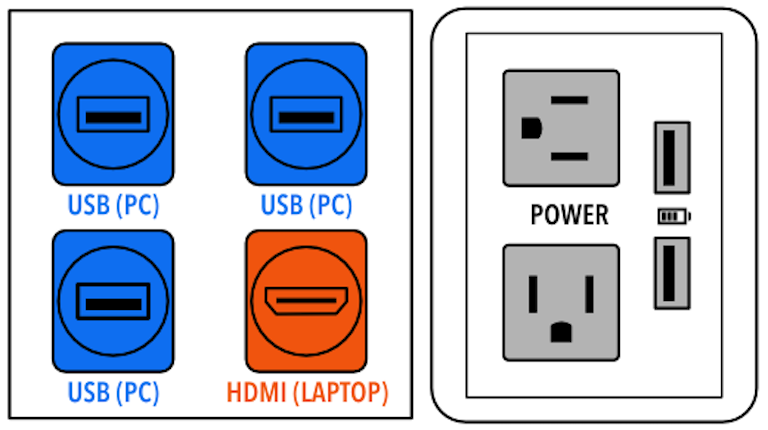
Which devices will you be using today?
Select from the list below to find instructions for your needs. Note that an illustrated guide is also provided in the room.
Table of Contents
Classroom PC
- Turn on TV and select input ‘PC‘
- Use wireless mouse and keyboard to operate the classroom computer.
NOTE: If the PC does not respond please ensure that the TV, computer, mouse and keyboard are switched on.
Classroom PC + USB stick
- Operate the TV and computer as above.
- Connect your USB device to one of the three table-top USB ports.
Classroom PC + Meeting OWL
- Operate the TV and computer as above.
- Connect the Meeting OWL to one of the table-top USB ports using as USB-C to USB-A cable.
- Log into Zoom and select the Meeting OWL as your camera and microphone.
Laptop + TV
- Turn on TV and select input ‘Laptop‘
- Connect laptop to table-top HDMI port and power outlet.
Laptop + TV + Meeting OWL
- Connect laptop to TV as above.
- Connect the Meeting OWL to the laptop with a USB cable.
(Use the included USB-C to USB-C cable with most modern laptops. A USB-C to USB-A cable is also included in the Meeting OWL kit.) - Log into Zoom and select the Meeting OWL as your camera and microphone.
Blu-Ray/DVD Player (Region 1/A)
- Turn on TV and select input ‘Disc Player‘
- Use the Blu-Ray/DVD player at the front of the room.
Blu-Ray/DVD Player (Other Region)
- Borrow a multi-region Blu-Ray/DVD player from the AVRC.
- Turn on TV and select input ‘HDMI‘
- Connect the player to the table-top HDMI port and power outlet.
Play Files (e.g. mp4, divx) from an Optical Disc
- Borrow a USB optical drive from the AVRC
- Turn on TV and select input ‘PC‘
- Connect the drive to a table-top USB port.
- Open and play files with VLC Player on the PC.