Setup Port Forwarding on VirtualBox VM
Port forwarding can be used with a VirtualBox Virtual Machine (VM) to quickly allow a network connection into the VM from the host. For instance, if you need to ssh into a VM with a specific tool such as vscode, you can use port forwarding as a simple alternative to setting up a full host-only network.
Table of Contents
This post assumes you already have a VM imported into VirtualBox
NOTE: Some SCS VMs may have port-forwarding preconfigured
Steps to setup port forwarding
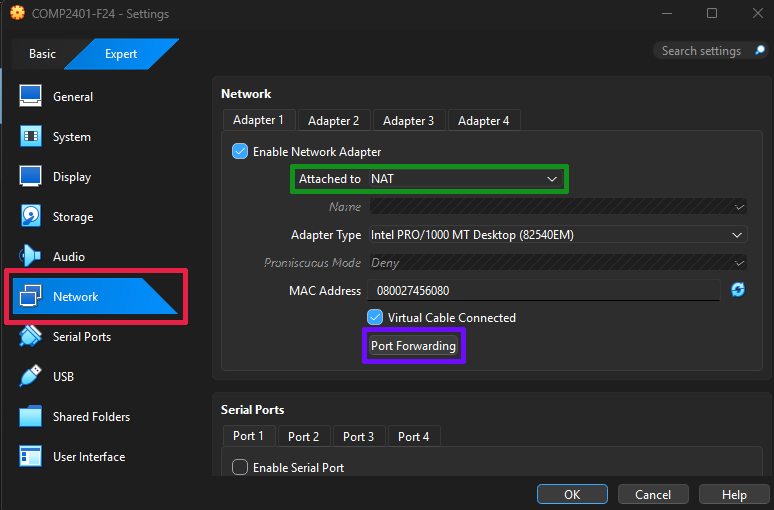
- Open the settings for your VirtualBox VM and select the Network tab (see Red box above)
- Ensure that the Network adapter is Attached to: NAT (see Green box above)
- Click on the Port Forwarding button (see Purple box above)
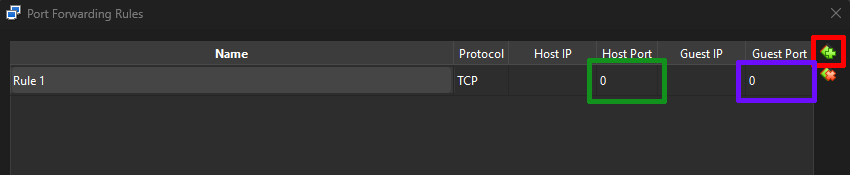
- In the Port Forwarding Rules window, click the small “plus” (+) icon to create a new rule (see Red box above)
- Fill in the desired port forwarding port numbers. For instance, if you want to be able to ssh to localhost port 2222, to get to port 22 (ssh) on your virtual machine, you would enter port 2222 as the Host port (Green box) and port 22 as the Guest port (Purple box).
- NOTE: You can rename Rule 1 if you wish, but that is not required. Host IP and Guest IP should both be left blank
- Press the window’s OK button to save
The next time you start the VM, the port forwarding will be setup. You may get a networking notification that a rule is being setup, and you may have to enter an admin password for your host device.
Test the connection
For the above example, you can test by using a terminal (mac/linux terminal, vscode, powershell, etc) to try an ssh to the VM. The username below is the username on your VM.
ssh -p 2222 username@localhost