Hybrid Events
Hybrid events are events that have an onsite and online audience or participants. This page describes hybrid solutions that work well for the resources available to the School of Computer Science.
Hybrid Meetings
-
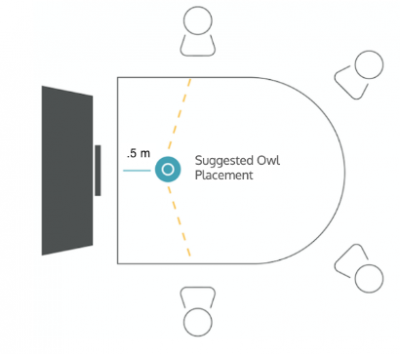
We recomend that you use a small conference room or office for small meetings:
- Data Science Conference room
- SCS Conference Room (HP5180)
Usually the Owl Conferencing camera is idea for a small room with a boardroom table and TV/Monitor display.
- Reserve the Owl Conferencing camera
- You will need a laptop
- Set up time: 30 minutes (WiFi, Windows & Zoom updates, and testing)
-
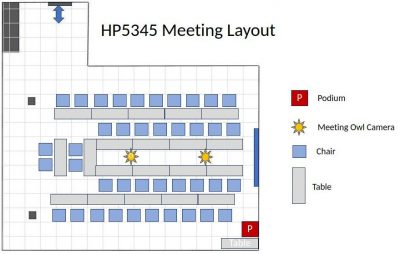
The SCS Seminar room (HP5345) can be arranged to host large hybrid meetings.
- Reservation: two Owl meeting cameras
- Required: Owls, at least one laptop, power extension & HDMI extension
- Set up time: 45 minutes (arrange tables, dual Owl config, host-laptop, updates and testing)
- We typically use the projector to show the online participants/meeting slides
- Avoid Feedback: Ask on-site participants to mute their Mic and turn off speakers
- Recomended: dedicated moderator/co-host to monitor chat and hybrid tasks
- Recording Option: The meeting software has a recording feature
Meeting Owl Features
- The Owl requires clear line of sight for the camera an microphone to function properly. If you can see the owl usually that is adequate.
- The Owl will focus on people that are talking
- In-room chatter and cross-talk will be broadcast automatically
- When you talk for the first time during the meeting it may take 5-10 seconds for the Owl to learn your position and adjust the microphone array accordingly. This could mean the view is not framed properly and temporary sound quality issues. The Owl will learn where people are in the room and these issues are typically resolved automatically.
- Dual Owl setup works well for large meetings and the Owl’s will automatically switch between them according to proximity to the person that is speaking
Seminars, Lectures, Tutorials or Presentations
-
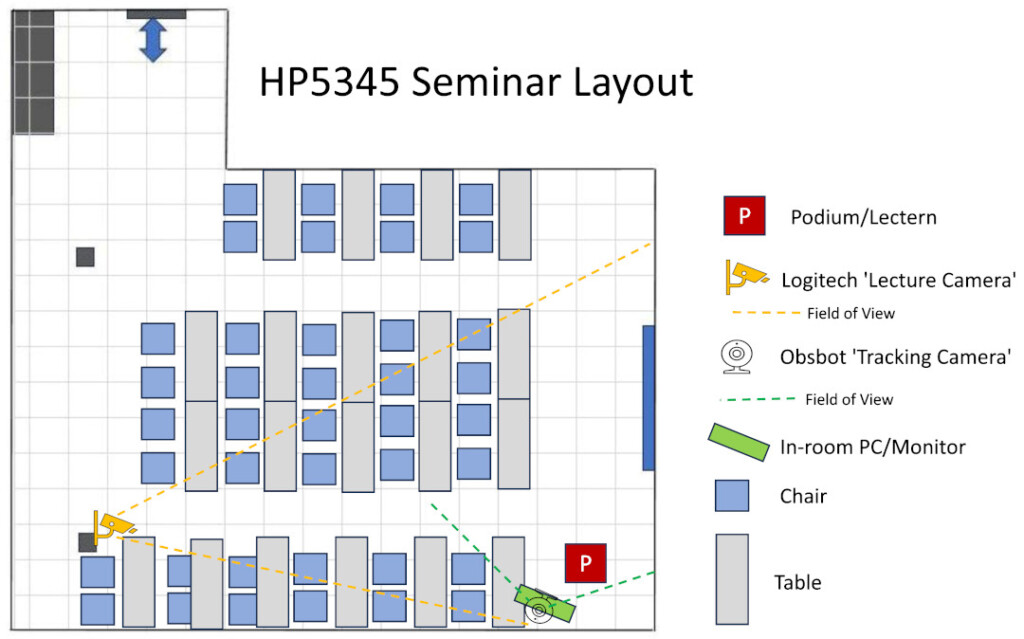
The SCS Seminar (HP5345) is equipped to host lectures, seminars or presentations for up to 40 people.
- There is an onsite computer that can be used for lecturers. You can login using your Carleton account.
- The Logitech ‘Lecture Camera’ is ideal for front-facing hybrid lectures with slides. It is configured to be used with the onsite computer.
- Teams/Zoom select camera: Logitech PTZ Pro 2. We recomend using a wireless mic with this camera.
- Reservation: reserve a wireless mic
- Set up time: 15 minutes (login to computer, configure wireless mic, configure Zoom/Teams, test hybrid session)
- Avoid Feedback: Ask in-room participants to mute their mic’s and turn off their sound
- Recomended: dedicated moderator/co-host to monitor chat and hybrid tasks
- Recording Option: The meeting software has a recording feature
-
The SCS Tutorial Lab (HP4155) is equipped to host Lectures, Tutorials, Seminars or Presentations and has seating up to 78 people.
Please refer to: https://carleton.ca/scs/tech-support/scs-rooms-support/tutorial-lab-hp4155/